


WellSpan
4.5655.00 Reviews
App Specs
- Version
- 11.7.3
- Updated On
- License
- Free
- Downloads
- 100,000+
- Developer
- WellSpan Health
- Categories
- Medical
- Platform
- Android
Screenshots
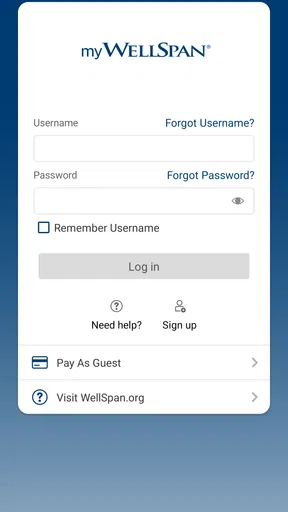
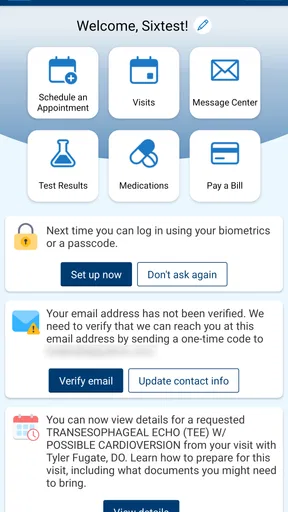
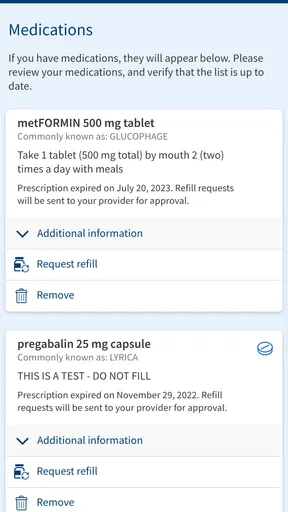
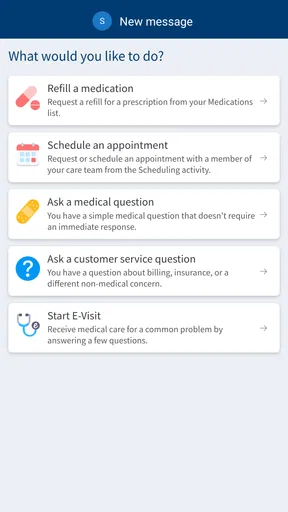
 Analysis by AppCompare
I tend to judge a healthcare app by a simple question: does it reduce the work involved in getting care, or does it merely place another layer between me and the clinic? My experience with WellSpan is that it is most useful when I already receive care through WellSpan Health and want one practical place for routine communication and appointment tasks. It is a free medical app from WellSpan Health, aimed at everyone, and its core purpose is straightforward: helping patients schedule appointments, message doctors, and manage parts of an ongoing care relationship.
That focus matters. This is not an all-purpose symptom checker, a fitness tracker, or a replacement for urgent medical attention. I see it more as a digital front desk for people who use WellSpan services. When it fits your healthcare situation, it can save time and make small administrative jobs less annoying. When it does not fit, installing it simply because it is free will not make it useful.
How I Decide Whether WellSpan Is Worth Using
My first decision criterion is whether the app connects to the healthcare organization I actually use. A patient portal is only valuable when it reflects a real care relationship. If my doctors, appointments, and messages are handled through WellSpan Health, the app has a clear role. If I normally visit unrelated clinics, use a different hospital network, or want a general health-management tool, I would look elsewhere rather than expecting this app to bring everything together.
The second criterion is the kind of task I want to complete. For a routine appointment, a non-urgent question for a doctor, or a quick check of my healthcare communication, a dedicated medical app is more convenient than calling a main office line and waiting through a menu. However, I would not use it as my first choice for an emergency, severe symptoms, or anything requiring immediate clinical attention. Digital messaging is useful for the right level of concern, not every level of concern.
I also consider how comfortable someone is with account-based healthcare tools. The convenience comes from having personal information and care communication in one place, so the initial setup and sign-in process are part of the experience. I would have patience during that stage and make sure I am using my own account carefully. A person who dislikes managing online medical access may still prefer speaking with a receptionist, especially for complicated scheduling.
The app has been available since August 23, 2011, which gives it a longer history than many newer healthcare tools. Its current version is 11.7.3, and it requires iOS 11 or later. That operating-system requirement is not especially demanding for compatible devices, but I would still check the phone before planning to rely on it. A medical app is most helpful when it is installed before I need it, not while I am already trying to solve a time-sensitive problem.
A realistic appointment-day example
Imagine that I need to arrange a follow-up visit after a routine consultation. Instead of searching for a phone number, calling during office hours, and explaining the same details to a receptionist, I can open the app and begin with the appointment workflow. If I also need to ask the doctor’s office a non-urgent question, messaging keeps that conversation connected to the care relationship rather than leaving me to remember which department I called.
Worth Reading Before You Choose

EA SPORTS FC Mobile 26 Is a Bigger Football Game, but It Takes Time

Flipboard Shows What News Apps Must Do Beyond the Feed

Switching to Android Auto Means Rethinking Your Driving Routine

Google Calendar Makes a Crowded Week Easier to Manage

Ludo King Makes the Most of the Minutes Between Plans

Baby Panda World Brings Quick Play to Modern Phones, but Its Game Library Feels Busy
That scenario shows the app’s practical strength: it can turn several small healthcare chores into actions I can start from the same place. It does not remove the need to provide accurate information or choose an appropriate appointment, but it can make the process feel less scattered. I especially appreciate that kind of convenience when I am at work, traveling between errands, or trying to handle healthcare for a family member without keeping several phone numbers in my contacts.
My advice is to prepare before opening the app. Know which appointment you need, have your calendar available, and write down the question you want to send. That small habit makes messaging more useful and reduces the temptation to send a vague note that creates another round of clarification. In my view, the app works best when I treat it as an organized channel, not as a substitute for thinking through what I need from the care team.
Where the app is strongest
The clearest advantage is the combination of appointment scheduling and doctor messaging in a single medical setting. Those tasks often sit on opposite sides of a healthcare experience: scheduling is administrative, while messaging feels clinical. Bringing them together can make the patient journey easier to follow, particularly when I am managing a continuing issue rather than making a one-time visit.
Another strength is familiarity. Because the developer is WellSpan Health, the app is built around that organization rather than trying to serve every hospital and clinic at once. That narrower purpose can be a benefit. I do not need to sort through features intended for unrelated providers, and the language of the app is more likely to match the way WellSpan handles appointments and communication.
The app also has a reassuring level of adoption for a regional healthcare tool. It has more than one hundred thousand installs, an average rating of 4.5 from around one and a half thousand ratings, and 653 written reviews. I do not treat those figures as proof that every patient will have a smooth experience, but they suggest that the app is being used by a substantial group of people and that many users find its main purpose worthwhile.
Its free price is another practical advantage. There is no separate purchase decision before trying it, so a WellSpan patient can test whether digital scheduling and messaging fit their routine. The Everyone content rating also makes it broadly suitable from an age-classification perspective, although the usefulness of a healthcare portal still depends on the individual account and care relationship rather than the age label alone.
Small workflows that make a real difference
One useful way to approach the app is to use it as a preparation tool, not only as a transaction tool. Before scheduling, I can clarify the reason for the visit and check my own availability. Before messaging, I can put the most important detail first, describe what I need, and keep the note focused. These habits may sound basic, but they are more valuable in a medical portal than repeatedly opening it without a clear goal.
A second practical insight is to separate routine questions from urgent ones. If I am asking about a follow-up, an administrative detail, or a non-urgent concern, messaging may be appropriate. If the situation is rapidly worsening or potentially dangerous, I would not wait for an in-app reply. The app’s convenience should never encourage me to use a slower channel for something that needs immediate attention.
A third insight is to use the same channel consistently when possible. If I schedule through one route, call through another, and message through a third, it becomes easier to lose track of what has already been requested. Keeping ordinary appointment and communication tasks inside the WellSpan workflow can make my own records and expectations clearer, even when the app cannot solve every part of the issue itself.
I also find it helpful to think about who needs access. For my own care, a personal phone is usually convenient. For a parent, child, or another person I help, the situation may involve additional account or authorization arrangements. I would not assume that installing the app automatically gives me permission to manage someone else’s healthcare. That is exactly the kind of situation where contacting the relevant office may be more efficient than trying random account settings.
Where another option may fit better
The usual alternative to WellSpan is not necessarily another app; it is often a phone call, a clinic website, or direct contact with an office. A phone call may be better when the appointment is complicated, when several departments are involved, or when I need an immediate answer about a scheduling exception. Speaking with a person can also be less stressful for someone who is uncomfortable explaining a medical situation through a message.
A web-based patient portal may suit people who do most of their healthcare administration from a desktop computer. A larger screen can make long forms, detailed messages, or family-care tasks easier to review. I would choose that route if I need to compare information carefully or if using a phone feels cramped. The app is more convenient for quick access, but convenience is not the same as being the best interface for every task.
A general health app may be preferable when the goal is tracking habits, recording exercise, monitoring personal wellness, or combining information from several unrelated providers. WellSpan is more focused on the healthcare relationship around WellSpan Health. That focus is its advantage for the right patient and its limitation for someone looking for a broad personal health dashboard.
I would also choose an alternative when my care is spread across multiple networks. A single-provider app can be excellent for one organization while leaving the rest of my healthcare outside it. In that case, I might still use WellSpan for WellSpan appointments and messages, but I would not expect it to replace every portal, record system, or communication method I already need.
There is also a human factor. Some people want a written record of their questions and replies; others find written medical communication slow or easy to misunderstand. If I know that I explain myself better aloud, or if the issue requires back-and-forth discussion, a call may be more efficient. If I want to review what I asked later, messaging has the stronger appeal. The better choice depends on the task, not on a general claim that digital is always superior.
The cost of changing from phone calls to the app
Because the app is free, the main cost of switching is not money. It is time, habit, and the effort of learning where each task belongs. I would expect the first use to involve signing in, confirming that I am connected to the correct healthcare relationship, and becoming comfortable with the available appointment and messaging paths. That initial friction is reasonable if I expect to use the app repeatedly.
The bigger adjustment is remembering to check the digital channel and to allow appropriate time for replies. A phone call gives me a live conversation, while a message creates a waiting period. I would not send a message and then immediately assume that no response means the request was ignored. For anything with a deadline, I would plan ahead or use the office’s recommended contact method.
Switching also changes how I prepare. With a phone call, a receptionist may guide me through the questions. In the app, I have more responsibility for choosing the right appointment reason and writing a useful message. That can be empowering, but it also means I should slow down rather than tapping through quickly. A wrong appointment type can create more work later, which cancels out the convenience I wanted in the first place.
For that reason, I would not delete every other healthcare contact method after installing WellSpan. I would keep the clinic’s normal phone option available for situations the app handles poorly. The best arrangement is often a combination: use the app for routine scheduling and non-urgent communication, and use direct contact when the request is complex, urgent, or outside the app’s practical scope.
Who should use it and who should skip it
I would recommend WellSpan first to patients who receive care through WellSpan Health and regularly need appointments or doctor communication. It is especially appealing to people who dislike waiting on the phone, prefer written messages, or want to begin routine healthcare tasks outside normal office conversations. It can also help busy users who need a consistent place for ordinary care administration.
I would be more cautious about recommending it to someone whose providers are not part of WellSpan Health. The app’s value is tied to that organization, so the installation alone will not create a useful healthcare hub. I would also suggest skipping it as a primary solution if the person wants emergency guidance, broad wellness tracking, or one universal portal for every medical provider.
Caregivers should think through access before relying on it. If I am helping another person, I would first make sure the account arrangement is appropriate and that the person’s privacy and preferences are respected. A convenient app does not remove the need for proper authorization or clear communication with the healthcare office.
My recommendation after using it
My recommendation is positive but specific: WellSpan is a practical patient-portal app, not a universal medical companion. Its best qualities come from staying focused on two everyday needs—appointments and communication with doctors—within the WellSpan Health ecosystem. The free access, broad age classification, established release history, and current 11.7.3 version make it an easy option to try for eligible patients using a compatible device.
I would install it before my next routine appointment, sign in when I have time, and test the basic workflow without waiting for a stressful healthcare moment. I would also keep expectations realistic: a message is not an emergency service, and a digital scheduler may not handle every complicated request as well as a person at the office. Used with that judgment, the app can remove unnecessary friction from ordinary care.
For a WellSpan patient who wants a simpler way to schedule and communicate, I think it is worth using. For someone outside that network or seeking a complete health-management platform, another option will likely fit better. That distinction is the key to deciding well: choose WellSpan when your main problem is managing WellSpan care, and choose a broader or more personal alternative when your needs go beyond that relationship.
Pros
- Easy access to appointments
- test results
- and medical records
- Secure messaging helps patients contact their care team remotely
- Medication lists and health information are available in one place
- Appointment reminders can help reduce missed visits
- Useful for managing care across participating WellSpan locations
Cons
- Features may be limited for patients outside the WellSpan network
- Some results or records may appear only after staff release them
- The app requires a reliable internet connection for most functions
- Older devices may experience slower performance or compatibility issues
- Not all appointments or services can be scheduled through the app
FAQs for WellSpan
What is the WellSpan app used for?
The WellSpan app is designed to help patients manage healthcare services through a mobile device. Depending on your location and account access, you may be able to find providers, schedule or request appointments, view parts of your medical information, check test results, manage prescriptions, receive messages, and review billing details. Available features can vary by WellSpan service, provider, and patient eligibility.
How do I sign in to the WellSpan app?
To use many of the app’s functions, you generally need a WellSpan patient portal account and must sign in with your existing credentials. New users may be able to create an account through the registration process, often using information provided by WellSpan. If you forget your password or cannot verify your identity, use the recovery options or contact WellSpan support rather than creating multiple accounts.
Can I schedule appointments and communicate with my doctor through WellSpan?
The app may allow you to request or schedule certain appointments, although availability depends on the department, provider, appointment type, and your patient status. Secure messaging may also be available for communicating with participating healthcare teams. It is important to remember that messages are not intended for emergencies, and replies may not be immediate, so urgent symptoms should be handled through appropriate emergency services.
Can I view test results, prescriptions, and medical records in WellSpan?
WellSpan may provide access to selected health information, including laboratory or imaging results, visit summaries, medications, allergies, and other portions of your electronic medical record. Information may not appear instantly and some results can be delayed while a clinician reviews them. Prescription refill requests and medication details may also depend on the pharmacy, provider, and the specific services connected to your account.
Is the WellSpan app free, and is it safe to use?
The WellSpan app is generally available to download without a separate app purchase, but healthcare services, appointments, prescriptions, or medical care accessed through it may involve insurance charges or other costs. Use the official app store listing and keep your device protected with a passcode or biometric lock. Because the app handles personal health information, avoid sharing login details and use secure networks whenever possible.


